changelog

what's new on Windows

1.1.7Nov 21, 2026

Proactive suggestions are back, drawings that scroll with the page, and next steps after every answer

This one has many of the things you've been asking us for. Proactive suggestions are back, rebuilt from scratch: every morning HeyClicky hangs a few things it can take off your plate under the notch, shows you the plan, and once you say Do it, it goes and does it. Drawings finally scroll with the page, so no more stale drawings on your screen. After every answer you get a few next steps to tap, and there's dictation in 117 languages and a subtle redesign with a calmer look throughout the app. Thanks to everyone who keeps giving us feedback, reporting bugs and suggesting features. Keep them coming <3

what's new

  • Proactive suggestions are back: We paused them last month to rethink how they show up, and rebuilt them from scratch. Every morning HeyClicky looks through your connected apps and the web, and hangs a few things it can take off your plate under the notch. We also made them more autonomous: See all spreads them on your screen, each showing what you'll get, how long it takes and its plan in advance on a yellow pad when you hover. Once you say Do it, it goes and does it. Adjust lets you type or say what to change first, and Nah throws it in the bin. Don't want them? Turn off Settings > Agents > Suggest agent tasks.requested byGunnar AriasKarinaJavi T.ShariGiulio ValoppiLi LiNusRainarPratikAbraão CoelhoBoran& more
  • Drawings scroll with the page: This one was long overdue: no more stale drawings on your screen. Rings, highlights, arrows and lines HeyClicky draws on a page now stay on what they point at as you scroll, in your browser, a PDF, a chat or an editor. They also follow a page you drag, like a map, and a row that scrolls sideways. Scrolling a different part of the window, like a sidebar, leaves them where they are, and cards, photos and 3D figures still float in place.requested byHrydayFederico FargionRam PrasadAlex Liu& more· asked for since our first release
  • Next steps after every answer: After every answer, HeyClicky predicts what you might ask next and suggests it as a few pills at the top of your screen. We made them a bit curious: one digs deeper, one has HeyClicky do the next thing for you. Tap one and it's asked. If you'd rather not see them, tell HeyClicky to stop or turn off Settings > General > Suggest next steps, and if you leave eight rows untapped they take an hour off on their own.
  • Change what it typed: When HeyClicky types something into a field for you, like a reply in Gmail, asking it to make it shorter or warmer now changes that text right where it is, instead of starting a whole job.
  • Dictation in 117 languages: Dictation picks up 34 more languages, from Lao and Uyghur to Igbo and Crimean Tatar, each tested by us first. Dictation's language now lives in Settings > Dictation, next to your custom words.
  • Voices in your language: If you talk to HeyClicky in a language other than English, it may offer you a few voices that speak it natively, with a sample of each in your language. Pick one, or keep the voice you have.requested byAbbasSobiHaseeb IqbalBoranEmir

a fresh look

  • A calmer new look: A subtle redesign throughout the app. Settings, the plans windows and every popup now share one look: a soft dotted background, flat cards and bigger page icons, with fewer words on every page. Billing is simpler too: your plan, your card and your invoices, and nothing else.
  • Shortcuts show a double tap as ×2, and Reset to defaults only shows once you've changed one.

onboarding

  • A faster tour: Saying hi and the drawing step now start answering before you press, so the first thing HeyClicky says comes right away instead of a few seconds later.
  • Skipped the tour?: You now get seven ideas to try what you skipped, like "Show me a heart in 3D" or "Explain what's on my screen", and a reminder of how to talk to HeyClicky that stays until you've held the keys once. Skip demo also asks once, "my lord, are you sure?", before letting you go.
  • First jobs that fit you: The first jobs HeyClicky plans for you at the end of the tour now look things up on the web about your world first, and the tour ends with four ideas to try together instead of three.
  • The HeyClicky mark shape-shifts into your cursor when it hatches, and the get-to-know-you questions sit in a cleaner, narrower window.
  • The intro video shows your real notch and dock, on every screen.

notch & chat

  • Smoother notch: The open notch now shrinks back into itself when it closes instead of going black first, and every notch card stands on the same soft dotted background as the chat.
  • The "hold to answer" reminder steps aside while an answer is being drawn, and next steps slide out from under an open notch.

agents

  • No more frozen jobs: A job that stops responding for 20 minutes is now stopped for you, with a note saying so. Retry picks up where it left off.
  • A job you've sent lots of follow-ups to stays quick, instead of spending its time tidying up its own memory.

windows

  • The cursor stays on top: HeyClicky's cursor no longer blinks behind its own windows, like the notch's agent cards or the notch after a click in Settings.
  • Sharp from the start: The open notch's pages and cards are sharp while they grow, instead of blurry for a moment before they settle.
  • With two monitors, the open notch moves to the screen whose notch you hover instead of staying where it first opened.
  • The tour's Back, music and Skip demo buttons light up as round pills when you hover them, and the pill that shows while HeyClicky drives has properly rounded ends.

fixes

  • 3D models with a curved shell, like a plane's body, no longer look dark on the outside.
  • In the chat, a job started without a message no longer shows up below its own Done.
  • Going from Home to Chat no longer flickers black where the windows were.
  • Logging out after setup opens the sign-in card in the notch instead of a notch that wouldn't open.
1.1.6Nov 16, 2026

HeyClicky UI in 18 languages, new plans, usage resets, and a notch for the new MacBook Pro

The HeyClicky app's UI is now in 18 languages, from its first screen to its last. HeyClicky already speaks 133 languages, so now the app around it can match the one you talk to it in. This release also brings new plans, billing you can manage right in Settings, and a notch that fits the new MacBook Pro's camera island. On Windows, all of this arrives in 1.1.6, along with a notch that floats as an island and a chat that opens instantly. Thank you to everyone who wrote in asking for HeyClicky in their language <3

what's new

  • HeyClicky in your language: The HeyClicky app's UI is now in 18 languages: English, Arabic, Chinese, Dutch, French, German, Hebrew, Hindi, Indonesian, Italian, Japanese, Korean, Polish, Portuguese, Russian, Spanish, Turkish and Urdu. It follows your computer's language, or you can pick one in Settings > Language, next to the languages you talk to HeyClicky in. Arabic, Hebrew and Urdu read right to left, and in every language but English HeyClicky talks with a voice made for it.requested bySamuel C.MuhannadMatyášJoãoRohaam& more
  • New plans: The new Pro and Max plans give you one monthly allowance for both voice messages and agent messages, shown as a percentage, so there's a lot more room for your agents. They also let you reset your usage for $10 whenever you run out, and dictation stays unlimited. Already subscribed? Nothing changes for you: you stay on your current plan with the same price and limits for as long as you keep it. If you'd like to move to the new plan, just email us at hi@heyclicky.com and we'll switch you over. You can compare every plan side by side on the plans page.
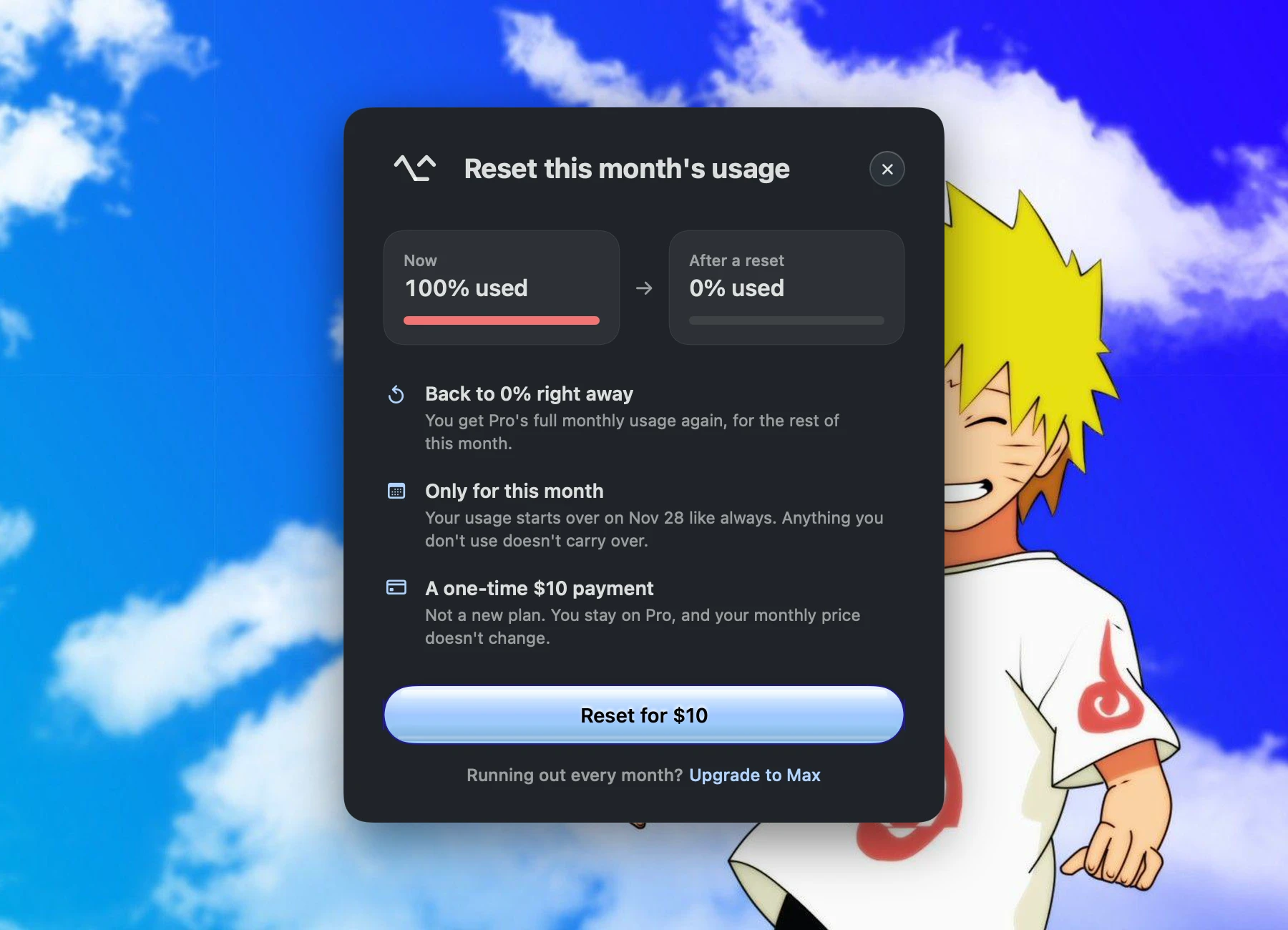
  • Reset your usage: On the new Pro plan, if you run out before your month is up, you can reset your usage to zero for $10 (₹900 in India, R$55 in Brazil). It's a one-time payment that leaves your plan as it is, and your usage starts over as usual on your billing date.
    Reset this month's usage: back to 0% right away for a one-time $10
  • Billing in Settings: Settings > Billing shows your plan, your card and your invoices. Change plans and see exactly what you'll pay before you confirm, update your card or billing details, and pause or cancel, all without leaving HeyClicky.
  • Know before you run out: The usage ring under the notch tells you how much you've used, and HeyClicky gives you a heads-up as you get close instead of stopping you mid-task. On the free plan your messages now come back every day at midnight.
  • Invite friends, get Pro: Every friend who starts using HeyClicky through your link gets you a month of Pro if you're on the free plan, or a free usage reset on the new Pro plan, and your friend gets 25% off their first month.

notch & chat

  • Replies grow out of the typing bubble: In the chat, the typing dots now stretch into each line of HeyClicky's reply, and the chat scrolls smoothly as it grows instead of jumping.
  • Your drawings stay in the chat: Every drawing HeyClicky makes for you is now kept in the chat, so you can play it back later.

windows

  • The notch is an island: The notch now floats just below the top of your screen as a rounded island, the way HeyClicky looks on the new MacBook Pro. Everything grows down out of it and folds back in, and the Listening, Thinking and Speaking strips fit their words.
  • Chat opens instantly: The chat now opens right away the first time after HeyClicky starts, with your messages filling in as they load, and opening or closing Chat and Settings from the notch no longer flashes black.
  • Billing like the Mac: Settings > Billing keeps your billing details folded away until you want them and lists your invoices with View and Download. Pausing or cancelling opens its own window with your options, one step at a time.
  • Simpler Settings: Launch at login, Pause HeyClicky, Request a feature, Shake to detach and Screen highlight are gone, as on the Mac. HeyClicky still starts with Windows; you can turn that off in Windows' Startup apps.
  • The Clear button under the notch only shows while something HeyClicky drew is still on your screen.
  • HeyClicky's cursor stays above the upgrade window and above drawings instead of slipping behind them.

agents

  • Open page on "Your turn": When a job hands a step back to you, like signing or paying, its card now has an Open page button that takes you right to it.
  • A step a job handed back to you stops showing as needing you after an hour, so an old one no longer keeps the notch's hand lit.
1.1.5Nov 6, 2026

Long jobs that finish, answers your way, and fixes for what bugged you most

This release goes after the things that frustrated you most last week. Long jobs keep going until they're done, HeyClicky remembers how you like to be talked to, saying no to a job sticks, and your agents can finally upload files on websites. On Windows, installs and updates get their own HeyClicky window, and the notch, typing and chimes behave. Thank you to everyone who wrote in <3

what's new

  • Answers the way you like them: Ask for shorter answers, a yes or no first, or simpler words, and HeyClicky remembers it and keeps doing it, today and next week. It also checks your screen before giving the next step, so it stops repeating steps you've already done.no update needed
  • Jobs can upload files: Your agents can now attach files on websites in Chrome, like a photo on a form. Before, Chrome refused every upload from the store extension. HeyClicky asks you once before a file of yours goes to a site, or you can turn on Settings > Agents > Always approve file uploads. The Chrome extension also installs its own updates now, as soon as no agent is using it.
  • Close the chat, keep the answer: Click anywhere outside the notch while HeyClicky is still answering a typed question and the chat folds away. The rest of the answer keeps coming as captions at the bottom of your screen, so you don't have to sit and wait.
  • Stop an agent from its chat: In the HeyClicky window, an agent's chat now has a Stop button while it's working. You can still type to steer it instead.requested byNus

windows

  • A HeyClicky window while you install and update: The installer now shows its progress in a small HeyClicky window, and Install & Relaunch shows "updating heyclicky" with a percentage, then "opening heyclicky" until HeyClicky is back. You'll see the update window on the update after this one, since it runs from the version being replaced.
  • Onboarding that moves like the Mac: The video card glides beside your cursor, also when it switches sides. The glows on the welcome, color and "give me a home" screens follow their shapes, the color dots have no square on hover, and the "I live in your notch now" card sits closer to the top.
  • A smaller notch: With Settings > Cursor > Hide floating cursor on, the cursor no longer parks in the notch as a black strip: it says "okay see you <3" and fades out, and the notch stays small, so it stops covering your browser tabs. The Listening and Thinking strips are narrower too. Showing the cursor again fades it back in at your mouse.reported byCarlos F.Alan Gonsalves
  • Typing works everywhere: You can now type in the box under a full agent reply and in the document view, the last places where your keys went to the app behind HeyClicky.reported byGanesh RevanthYoussef HeibaMatt
  • Settings switches no longer look switched on when you hover them.reported byGanesh Revanth
  • Alt+Tab only shows HeyClicky while one of its windows is open, not for the notch alone, and the intro, tour and Settings windows show HeyClicky's logo there and on the taskbar instead of a blank icon.
  • Chimes play cleanly on Bluetooth and built-in speakers, with no crackle.

agents

  • Long jobs finish: Big jobs, like tagging two weeks of email, could wrap up early with work left over, or lose track of the goal partway through. They now pick up where they left off and keep going until it's done, with notes on your goal and your rules that they read again as they go.reported byArunav TiwariRami Ghamrawi
  • Jobs remember overnight: A job that sat quiet for 6 hours used to forget its whole conversation, so a daily routine started from scratch every morning. Jobs now keep their history no matter how long they wait.reported byRami Ghamrawi
  • Passing work to a job: When you ask HeyClicky to send something to a job, or just say yes to a plan it described, the job now gets the details you two agreed on, not only your last few words.
  • Chrome holds on through slow pages: One slow step on a heavy page, like Google Tag Manager, used to cut a job off from Chrome and tell you to reconnect it while it was still connected. Jobs now keep their access and check the page again before carrying on.reported byArunav Tiwari
  • No means no, until you say go: Tap Not now when a job asks to use your computer and it won't ask again for 30 minutes, and HeyClicky tells you right away instead of going quiet. Changed your mind? Just tell the job to go ahead.
  • Fewer surprise follow-ups: When a job reports back, HeyClicky now tells you what's left and asks, instead of sending the job more work on its own and using another agent message. Jobs also stop asking permission for tests and fixes you already asked for.
  • Follow-ups bring the screen: A message you send a working job while looking at something new now brings that screenshot along, so the job sees what you see.
  • How many messages do I have left?: Ask HeyClicky and it now gives you a real answer, talk messages included.requested byRami Ghamrawi

voice

  • Fewer "I didn't catch that": HeyClicky no longer guesses which language you'll speak, and it ignores stray bits of noise that came out in a language you never use. Those were behind most of its "I didn't catch that" replies.reported byMeviola Karriqi
  • Honest about safety filters: When our AI provider's safety filter blocks a request, like hands-on security practice, HeyClicky now says so plainly and offers to explain the ideas instead, rather than "try asking me again".
  • Recording apps aren't calls: Recording in GarageBand, Audacity, OBS or another recording app no longer counts as being on a call, so HeyClicky still tells you when your jobs finish.

fixed

  • Setting up the Chrome extension on an older version could stop at "please turn on Developer mode yourself". HeyClicky turns it on for you again.no update needed
  • A long typed message could show up twice in the chat.
  • Keep going after a paused job works again, and a job that fails or pauses now says why in its chat.
  • A routine's task could lose its first words, so "Each day at 9 a.m." became "A.m.".
  • HeyClicky says "the escape key" instead of "esc" when it starts driving, and Settings > Dictation shows your Dictionary above Language.
1.1.4Oct 30, 2026

Go deeper with your agents, support for 130+ languages, and lots of bug fixes

Open the notch into a big window to dig into any agent: its whole chat, the files it made, and what it's doing right now. HeyClicky also talks in 130+ languages now. For much less of an accent, pick one of the 30 new voices in Settings > Voice > Voices. Plus lots of bug fixes. Thank you to everyone who wrote in <3

Watch the full video on X.

what's new

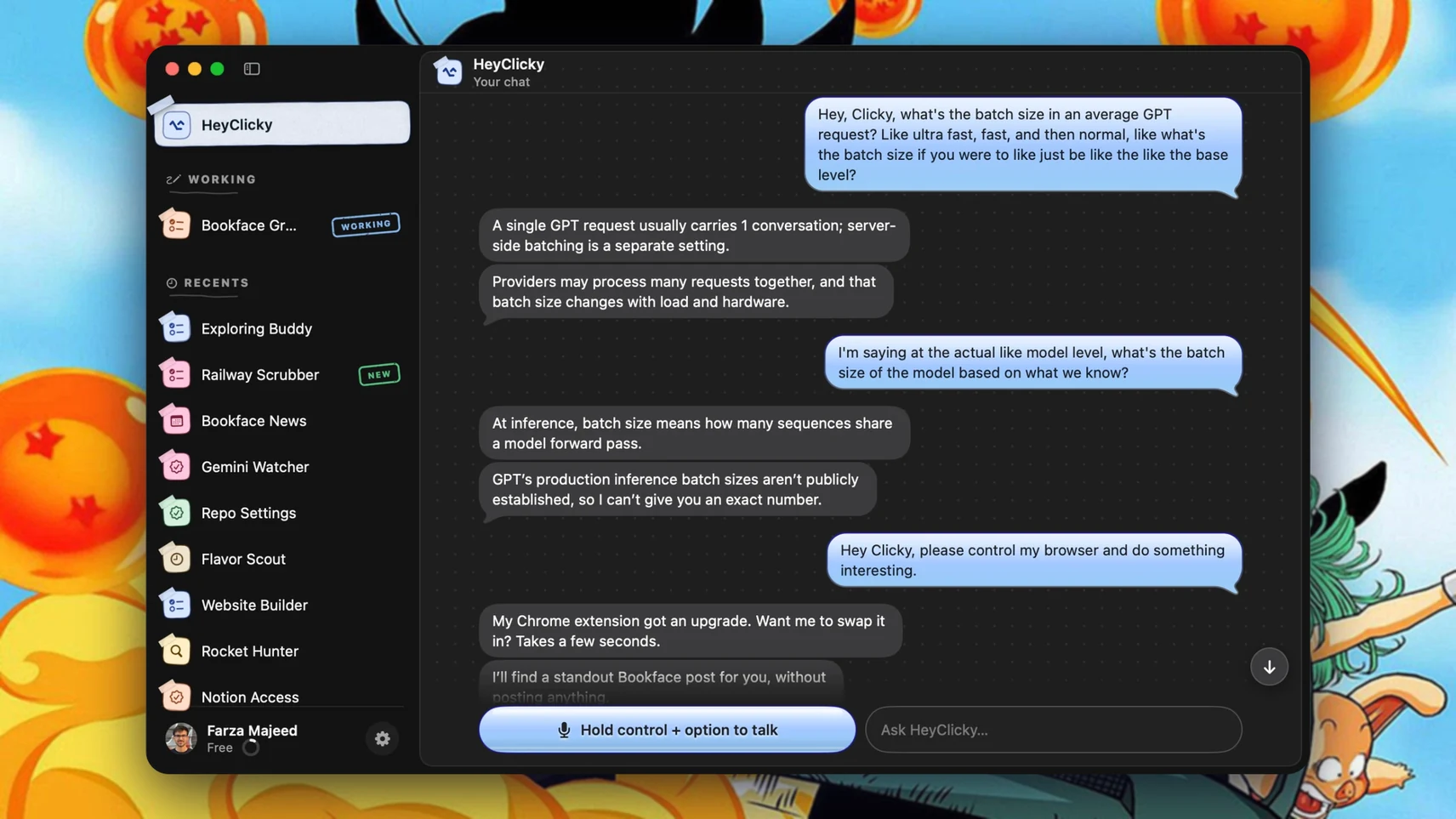
  • The HeyClicky window: Your chat, full replies, documents and Settings can now open into a resizable window that grows out of the notch. Your chat with HeyClicky and every agent's chat sit in a sidebar, documents open beside the chat, and it follows your computer's light or dark look.requested byKarinaNusOzni TolliverSelimcan Biçer
  • Voices in 130+ languages: HeyClicky now talks to you in more than 130 languages: just talk to it in yours. For much less of an accent, open Settings > Voice and pick one of the 30 new voices under Voices. They sound like someone from there, not an English speaker reading a script. Tap a voice to hear it first.
  • Agents get names: Every job gets a short name like "Inbox Hunter", shown on its card and in the window's sidebar, so you can tell your agents apart at a glance. Press ← and → to flip through the cards under the notch.
  • Smarter ears in every language: Voice and dictation now hear you through Google's newest speech model. It picks up your language on its own and follows you when you switch mid-sentence, like English with Hindi or Urdu.reported byAlan Gonsalves
  • Dictation in 83 languages: The language picker in Settings > Dictation now has 83 languages, and picking Urdu finally writes Urdu.
  • Chrome in one click: The HeyClicky extension now comes from the Chrome Web Store, so connecting it is just Add to Chrome, no Developer mode. It works in Edge, Brave, Arc and Vivaldi too. If you have the old preview copy, HeyClicky can swap it for the new one for you.
  • Updates install themselves: Once an update has downloaded and HeyClicky has been idle for 5 minutes, it restarts into the new version on its own. No more staying on an old version for weeks.

agents

  • Long jobs keep going: A job that runs past 20 minutes now just keeps working instead of pausing, and still costs one agent message as long as it stays within its budget. When a job does need your OK, it shows Keep going instead of looking broken.reported bySurya Adhikari
  • Agents that remember: Jobs now remember earlier work you've done together, read public web pages without asking for Chrome, and pick up your answer to a Chrome question in the middle of what they're doing.
  • Your chat updates as you talk: What you say and what HeyClicky answers now show up in the chat as it happens, and the chat stays still when a new message arrives.

fixed

  • A drive could end the moment it started, as soon as your pointer left the Let Clicky drive button.reported byAbhinav Dey
  • A message sent to an agent that was already working was charged as a new agent message. It now counts as part of the same job, and a job that never got started is refunded.reported byAbhinav Dey
  • Jobs could fail on a brief database error and show you the raw error. They now ride it out.reported bySelimcan Biçer
  • Jobs failed on networks that block some web addresses, and after an app was disconnected. They now carry on without that app.
  • A job could break for good after reading a page with a flag emoji in it.
  • Sending a follow-up right after a job finished said it was still working, and large images could make a job fail.reported byAbhinav Dey
  • Voice could get stuck on "Speaking" with some audio devices.
  • A tiny crack in the chime when you pressed the talk keys.
The new HeyClicky window, with your chat and every agent listed in its sidebar, over a Dragon Ball wallpaper
The HeyClicky window.
1.1.3Oct 24, 2026

A quick check of the new updates

A small behind-the-scenes update that checks HeyClicky's new self-updating works smoothly. Nothing changes in how you use it.

improvements

  • Updating from 1.1.2 to this version happens on its own, which is how every update arrives from now on.
1.1.2Oct 24, 2026

HeyClicky for Windows now updates itself

HeyClicky now updates itself, comes with a new installer that works on every PC, and fixes the crashes and bugs you told us about in the first few days.

what's new

  • Updates install themselves: HeyClicky checks for a new version in the background and installs it when you quit, or right away from Settings > General > Install & Relaunch. If you're on 1.1.1, download it once more from heyclicky.com and you won't have to again.
  • A new installer for every PC: The installer is small, signed and the same file every release, so Windows should stop warning about it, and when HeyClicky can't run on a PC it says exactly why, with an Email us button.

fixes

  • HeyClicky didn't start on Windows set to a language that writes numbers with a comma, like French, German or Spanish.
  • 3D drawings work on PCs whose graphics card can't draw them the usual way.
  • Clicking the chat box after HeyClicky drove your PC kept giving the keyboard back to the app behind it.
  • A drive could end the moment it began, and typing during a drive now stops as soon as you take the screen back.
  • Dragging a drawing's cards, turning a 3D figure after moving its window, and a few crashes from the first days.
1.1.1Oct 23, 2026

HeyClicky can draw in 3D, 2D and much more

Our biggest update yet. HeyClicky now explains things by drawing right on your screen, in 2D and 3D, with one brain that sees, talks, remembers and gets things done. It can drive your Mac for you, work in your Chrome, and everything lives in one simple notch. Thank you to everyone who wrote in and tried the early builds <3

Watch the full video on YouTube.

what's new

  • HeyClicky for Windows: The first version of HeyClicky for Windows is out, for Windows 10 and 11. Get it from the download for windows button on the homepage. This first version can't update itself, so download 1.1.2 or later once by hand to get updates from then on.
  • HeyClicky draws, in 2D and 3D: Ask about anything and HeyClicky circles, points and sketches right on your screen while it talks. Explanations land on little cards with real photos, and when the answer is a real thing, like an engine, a molecule or a building, HeyClicky builds a 3D model you can drag around and click on to ask about any part.
  • One brain: HeyClicky now has one brain that hears you, sees your screen, answers, and hands bigger work to agents. It starts answering a couple of seconds after you let go, remembers what was on your screen earlier in the conversation, and remembers your conversations from day to day.
  • HeyClicky drive: HeyClicky can take the wheel. When something needs doing in an app on your computer, HeyClicky asks, and with your yes it moves the mouse and types while you watch. Move your mouse, talk or press Escape and you're back in control.reported byJon Cleary
  • The HeyClicky Chrome extension: Your agents can now work in your own Chrome, on the sites you're already signed into, in their own tab group beside your tabs. HeyClicky asks once, the first time a task needs it, and can install it for you.reported bySantiago SalinasMike Lee
  • A new notch: Everything now lives in your notch: Home, your whole chat with HeyClicky, and Settings. Agents you've handed work to hang from the notch as little windows that show their plan while they work and their result when they're done.requested bySambarta
  • Captions: Turn on "Captions while HeyClicky talks" in Settings > Voice to see HeyClicky's words at the bottom of the screen while it talks. Typed questions that get a drawing show their answer as captions too, so the chat stays out of the way.

also new

  • Just hand it off: Ask for something bigger and it runs as a job with its own window on the notch. Follow up and it picks up where it left off. Clickys you made before are still there.
  • Routines, just by asking: Say "every Tuesday and Thursday at 5, check my inbox for invoices" and HeyClicky sets it up. Change, pause or delete it the same way, or from Settings > Routines.
  • A shorter tour: Onboarding skips the style step, shows HeyClicky driving and dictation, and ends by drawing where you're headed.
  • Suggestions are taking a break: Suggested tasks are paused while we rethink how they show up. They'll be back soon.